If you spend hours typing, gaming, or scrolling on your phone, your wrists and forearms are under constant low-grade stress. This repetitive strain accumulates over time, leading to tightness, discomfort, and in some cases, conditions like carpal tunnel syndrome or tendinopathy.
The solution is simple but often neglected: regular stretching. A few minutes of targeted wrist and forearm work can relieve tension, improve blood flow, and help prevent the chronic issues that sideline so many office workers.
This guide covers the best stretches for wrists and forearms, a quick desk routine you can do anywhere, and strategies for preventing repetitive strain injuries.
Why Do Wrists and Forearms Get Tight?
The muscles that control your fingers do not actually live in your hand. They are in your forearm, connected to your fingers via long tendons that pass through the wrist. When you type or use a mouse, these forearm muscles contract repeatedly, often for hours without adequate rest.
Common causes of wrist and forearm tightness:
- Prolonged typing: Sustained finger flexion keeps the forearm flexors contracted
- Mouse use: Gripping and clicking engage the forearm and wrist muscles asymmetrically
- Phone scrolling: Thumb-intensive movements stress the tendons on the thumb side of the wrist
- Gaming: Intensive keyboard and controller use with sustained wrist extension
- Gripping activities: Cycling, weightlifting, climbing, and other grip-intensive sports
A 2019 study published in Applied Ergonomics found that computer workers who took regular stretch breaks reported significantly less discomfort than those who did not.1
Wrist and Forearm Anatomy
Understanding the basic anatomy helps you stretch more effectively:
Wrist flexors: Muscles on the palm side of your forearm that bend your wrist toward your palm and curl your fingers. These are the muscles that tighten from typing.
Wrist extensors: Muscles on the back of your forearm that bend your wrist backward and straighten your fingers.
Carpal tunnel: A narrow passageway in your wrist through which tendons and the median nerve pass. When the tendons swell from overuse, they can compress the nerve, causing numbness, tingling, and pain.
Pronators and supinators: Muscles that rotate your forearm (turning your palm down or up). These are engaged during mouse use and many daily activities.
Best Wrist Stretches
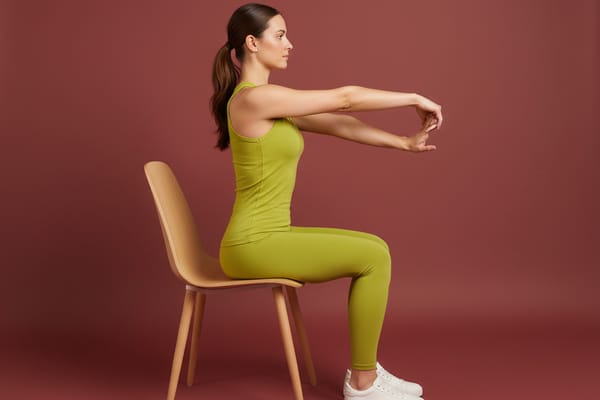
1. Wrist Flexor Stretch (Prayer Stretch Extension)
What it targets: Wrist flexors, forearm muscles on the palm side
This is the fundamental stretch for anyone who types regularly.
How to do it:
- Extend one arm in front of you with the palm facing up
- Use your other hand to gently pull your fingers back toward your body
- Keep your arm straight (slight bend is okay if fully straight is uncomfortable)
- You should feel a stretch along the inner forearm
- Hold for 20-30 seconds per side
Key tip: Keep your shoulders relaxed and down. Do not hunch or tense up during the stretch.
2. Wrist Extensor Stretch
What it targets: Wrist extensors, forearm muscles on the back side
This stretch addresses the muscles that work during mouse gripping and keyboard extension.
How to do it:
- Extend one arm with the palm facing down
- Use your other hand to gently push down on the back of your hand, flexing the wrist
- Keep the stretching arm straight
- You should feel the stretch along the outer forearm
- Hold for 20-30 seconds per side
3. Prayer Stretch
What it targets: Both wrist flexors and extensors
A symmetrical stretch that works both sides simultaneously.
How to do it:
- Press your palms together in front of your chest with fingers pointing up
- Keeping palms together, slowly lower your hands toward your waist
- Stop when you feel a comfortable stretch in your wrists and forearms
- Hold for 20-30 seconds
Variation: For the reverse prayer stretch, press the backs of your hands together with fingers pointing down.
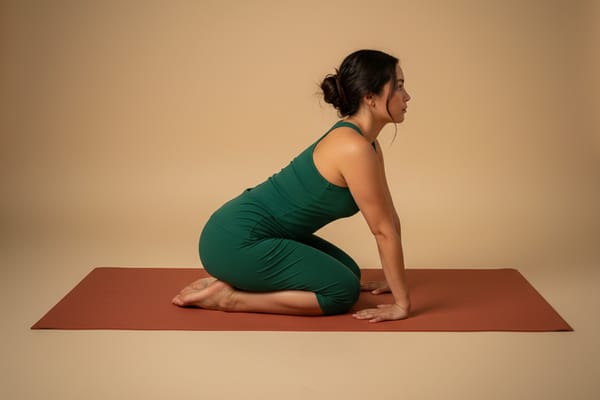
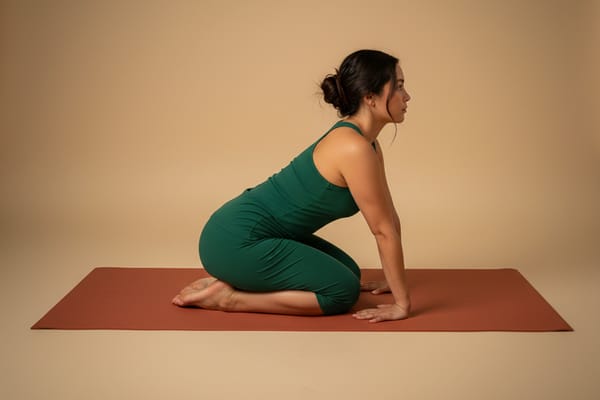
4. Tabletop Wrist Extension Stretch
What it targets: Wrist flexors, fingers, forearms
A more intense version that uses body weight to deepen the stretch.
How to do it:
- Start in a tabletop position (hands and knees)
- Rotate your hands so your fingers point toward your knees
- Keep palms flat as you gently rock back toward your heels
- Only go as far as comfortable
Key tip: Spread weight evenly across both hands to avoid overstressing any finger.
5. Wrist Circles
What it targets: All wrist muscles, joint mobility
Dynamic movement that warms up the wrist joint and improves mobility.
How to do it:
- Hold your hands in front of your chest, elbows still
- Draw slow, controlled circles with your wrists
- Complete 10-15 circles in each direction

Key tip: Keep the movement smooth and controlled. If you hear clicking or feel grinding, reduce the range of motion.
6. Finger Spreads
What it targets: Intrinsic hand muscles, finger extensors
This stretch counteracts the sustained finger flexion of typing.
How to do it:
- Spread your fingers as wide as possible
- Hold for 5 seconds
- Relax and repeat 10 times
Variation: Use a rubber band around your fingers and spread against the resistance for strengthening.
Best Forearm Stretches
1. Pronator Stretch
What it targets: Pronator muscles, inner forearm
These muscles rotate your forearm to turn your palm down (pronation).
How to do it:
- Extend one arm with the palm facing up
- Use your other hand to gently rotate the extended hand further into supination (palm up)
- Keep your elbow straight
- Hold for 20-30 seconds per side
2. Supinator Stretch
What it targets: Supinator muscle, outer forearm
This muscle rotates your forearm to turn your palm up.
How to do it:
- Extend one arm with the palm facing down
- Use your other hand to gently rotate the extended hand further into pronation (palm down)
- Keep your elbow straight
- Hold for 20-30 seconds per side
3. Forearm Flexor Stretch (Standing Wall Version)
What it targets: Forearm flexors, wrist
A variation that allows for deeper stretching.
How to do it:
- Place your palm flat against a wall with fingers pointing down
- Keep your arm straight and gently lean away from the wall
- You should feel a stretch along the entire inner forearm
- Hold for 20-30 seconds per side

5-Minute Desk Routine
This quick routine can be done at your desk without any equipment. Do it once or twice during your workday.
1. Wrist circles (30 seconds) 10 circles each direction
2. Wrist flexor stretch (30 seconds each side) Arm extended, palm up, pull fingers back
3. Wrist extensor stretch (30 seconds each side) Arm extended, palm down, push down on back of hand
4. Prayer stretch (30 seconds) Palms together, lower toward waist
5. Finger spreads (30 seconds) Spread fingers wide, hold, repeat 10 times
6. Fist squeezes (30 seconds) Make a tight fist, hold 5 seconds, release, repeat 6 times
Total: 5 minutes
Exercises to Prevent Carpal Tunnel
Carpal tunnel syndrome occurs when the median nerve gets compressed in the carpal tunnel. A 2017 systematic review in the Journal of Occupational Rehabilitation found that workplace stretching programs reduced symptoms in workers at risk for carpal tunnel.2
Median Nerve Glide
This exercise helps the median nerve move freely through the carpal tunnel.
How to do it:
- Start with your arm at your side, elbow bent, wrist neutral, fingers in a fist
- Extend your fingers and wrist, keeping your elbow bent
- Extend your elbow while keeping your wrist and fingers extended
- Extend your wrist back (palm toward ceiling)
- Turn your forearm so your palm faces up
- Gently stretch the thumb with your other hand
- Move smoothly through these positions, do not hold at end range
- Repeat 10-15 times per arm
Important: This should be a gentle glide, not a stretch. If you feel tingling, numbness, or pain, reduce the range or stop.
Tendon Glide Exercises
Help the tendons move smoothly through the carpal tunnel.
Position sequence (hold each for 5 seconds):
- Straight fingers (fingers extended)
- Hook fist (fingers bent at the middle and end joints only)
- Full fist (all joints flexed)
- Tabletop (fingers straight, bent only at the knuckles)
- Straight fist (fingers bent at knuckles, middle joints straight)
Repeat the full sequence 5-10 times.
Wrist Strengthening
Strengthening the forearm muscles can help prevent overuse injuries.
Wrist curls: Hold a light weight (1-3 pounds) with palm up, curl your wrist up and down. 2 sets of 15.
Reverse wrist curls: Hold a light weight with palm down, extend your wrist up and down. 2 sets of 15.
Grip squeezes: Squeeze a stress ball or grip strengthener, hold 5 seconds. 2 sets of 10.
Stretches for Gamers and Programmers
Gaming and programming involve prolonged wrist extension (keyboard tilt), sustained finger flexion, and repetitive clicking or tapping. These activities stress the forearm extensors and flexors in specific ways.
Key recommendations:
- Set a timer: Take a 2-minute stretch break every 30-45 minutes
- Prioritize extensor stretches: Gaming and typing often keep wrists extended, tightening the extensors
- Use neutral wrist position: Adjust keyboard tilt and mouse height to minimize wrist extension
- Include nerve glides: Programmers and gamers are at higher risk for carpal tunnel and should include median nerve glides regularly
A 2021 study found that esports players who performed regular hand and wrist exercises reported significantly less pain and better performance.3
Ergonomic Considerations
Stretching works best alongside proper ergonomics. Key principles:
Keyboard position: Keep your wrists in a neutral position (not bent up or down). A split keyboard or negative tilt keyboard tray can help.
Mouse position: Keep the mouse close to your body and at the same height as your keyboard. Consider an ergonomic vertical mouse.
Monitor height: Position your screen so your eyes are at the top third. This reduces neck strain, which can contribute to referred arm and hand symptoms.
Chair height: Your elbows should be at approximately 90 degrees when typing.
Take breaks: The American Academy of Orthopaedic Surgeons recommends taking breaks every 30 minutes to stretch and move.4
When Stretching Is Not Enough
See a healthcare provider if you experience:
- Persistent numbness or tingling in your fingers
- Weakness in your grip or difficulty holding objects
- Pain that wakes you at night
- Symptoms that do not improve after 2-3 weeks of stretching and ergonomic changes
- Visible swelling or warmth in the wrist
These symptoms may indicate carpal tunnel syndrome, tendinopathy, or other conditions that require professional treatment.
Frequently Asked Questions
How often should I stretch my wrists?
At minimum, stretch for 5 minutes at the start and end of your workday. For those at higher risk (heavy computer users, gamers), add a quick stretch break every 30-45 minutes.
Can wrist stretches prevent carpal tunnel syndrome?
Research suggests that regular stretching and exercise can reduce the risk of developing carpal tunnel syndrome, particularly in people who perform repetitive hand tasks.2 However, stretching may not prevent carpal tunnel caused by other factors like genetics or pregnancy.
Should I stretch before or after computer work?
Both. Light stretching before work warms up the muscles and tendons. Stretching after work helps release the tension accumulated during the day.
Is it normal for wrists to crack during stretches?
Occasional cracking or popping without pain is generally harmless. If cracking is accompanied by pain, swelling, or reduced mobility, see a healthcare provider.
Can I overstretch my wrists?
Yes. Wrist structures are relatively delicate compared to larger joints. Use gentle pressure and never force a stretch to the point of pain. If a stretch hurts, back off.
How long does it take to see improvement?
Most people notice reduced tightness within 1-2 weeks of consistent stretching. More significant improvements in chronic symptoms may take 4-6 weeks.
Key Takeaways
- Wrist and forearm tightness is preventable: Regular stretching counteracts the effects of typing, gaming, and phone use
- The 5-minute desk routine works: Consistent short breaks are more effective than occasional long sessions
- Address both flexors and extensors: Computer work stresses both muscle groups
- Nerve glides help prevent carpal tunnel: Include them in your routine if you are at risk
- Combine stretching with ergonomics: Proper setup reduces the strain that stretching must address
- Seek help if symptoms persist: Numbness, tingling, and weakness warrant professional evaluation
Related Articles
- Stretching for Desk Workers: A Complete Guide
- Tech Neck: Causes, Symptoms, and Solutions
- Shoulder Mobility: The Complete Guide
References
Waongenngarm P, Areerak K, Janwantanakul P. (2018). The effects of breaks on low back pain, discomfort, and work productivity in office workers: A systematic review of randomized and non-randomized controlled trials. Applied Ergonomics, 68, 230-239. PubMed ↩︎
Huisstede BM, Hoogvliet P, Franke TP, et al. (2018). Carpal Tunnel Syndrome: Effectiveness of Physical Therapy and Electrophysical Modalities. An Updated Systematic Review of Randomized Controlled Trials. Archives of Physical Medicine and Rehabilitation, 99(8), 1623-1634. PubMed ↩︎ ↩︎
DiFrancisco-Donoghue J, Balentine J, Schmidt G, Zwibel H. (2019). Managing the health of the eSport athlete: an integrated health management model. BMJ Open Sport & Exercise Medicine, 5(1), e000467. PubMed ↩︎
American Academy of Orthopaedic Surgeons. (2022). Carpal Tunnel Syndrome. OrthoInfo. AAOS ↩︎
